Cognitive Load in AI-Powered Interfaces: Making Smart Feel Simple
You open a new AI assistant app that promises to write emails, summarize documents, and automate your day. But instead of clarity, you’re met with a blank prompt and no guidance. What should you ask? How should you phrase it? The magic of AI quickly turns into confusion.
As AI tools become increasingly embedded in our everyday experiences — from productivity apps to creative tools — their interfaces often struggle to keep up with their capabilities. Despite their power, these tools can feel overwhelming or mentally taxing.
This is the paradox of AI-driven design: Smarter doesn’t always mean simpler. Behind the sleek promise of automation lies a hidden cost — cognitive load — the mental effort required to understand, navigate, and trust these systems.
This article will explore why reducing cognitive load is essential for designing successful AI interfaces. We’ll look at how poor design increases friction and outline strategies that help users feel confident, in control, and supported when interacting with AI.
What Is Cognitive Load — and Why It Matters
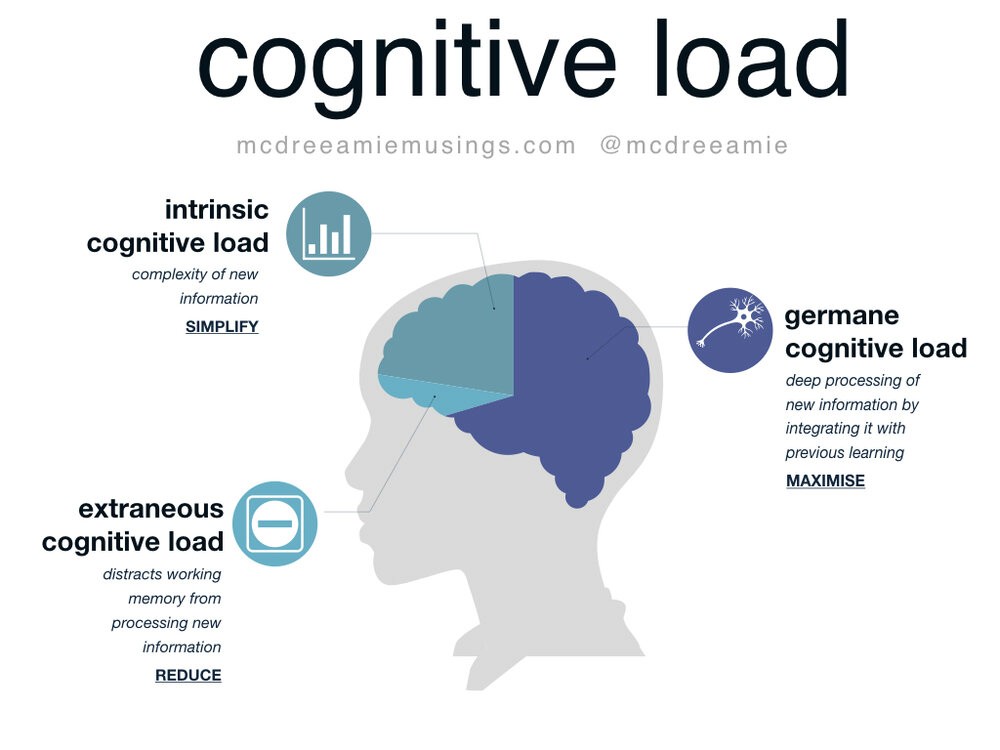
Cognitive load is the mental effort needed to complete a task, like juggling. A few balls? Fine. Too many? Chaos. In design, especially for AI interfaces, this means balancing how much users have to think just to use the tool.
There are two types of load:
Intrinsic load (learning something new)
Extraneous load (fighting a confusing UI)
AI tools often increase extraneous load through vague prompts, unclear feedback, or unpredictable behavior. This leads to frustration, errors, or users abandoning the tool entirely. For AI to truly help users, designers must reduce unnecessary complexity. Smart should feel simple, not mentally exhausting.
The AI Double-Edged Sword: When “Smart” Becomes “Stressful”
AI can enhance user experiences, but without thoughtful design, it can quickly overwhelm. Here are common ways AI features backfire:
Information Overload: Too many AI-generated insights can drown the user in noise.
Choice Paralysis: Endless suggestions leave users unsure of what to pick.
Black Box Behavior: Lack of transparency forces users to guess how the AI thinks.
Feature Bloat: Interfaces packed with AI tools become cluttered and hard to navigate.
Micromanagement Anxiety: Users feel they must constantly supervise or correct the AI.
Think of predictive text that finishes your sentence wrong, an “intelligent” feed that buries what you care about, or a dashboard that floods you with unfiltered metrics. Without clarity and control, smart features become stress triggers.
The Goal: Designing for Simplicity, Not Just Intelligence
The real power of AI doesn’t lie in how complex or capable it is — it lies in how seamlessly it fits into the user’s workflow. As designers, our goal shouldn’t be to showcase intelligence, but to design AI that feels invisible, intuitive, and empowering. When interfaces prioritize simplicity, users feel supported rather than overwhelmed. This is the heart of the philosophy: “Make smart feel simple.” Great AI quietly reduces friction in the background, helping users achieve more with less effort, not forcing them to wrestle with the technology that’s supposed to help.
Strategies: How to Tame Cognitive Load in AI Interfaces
1. Automate the Tedious
Let AI handle repetitive tasks like data entry, tagging, or sorting — freeing up mental space for users to focus on what matters. Example: Auto-categorizing emails, smart form filling.
2. Offer Smart Defaults & Suggestions
Reduce decision fatigue with intelligent defaults and helpful prompts that guide users without needing full input. Example: Smart replies, suggested routes, pre-filled fields.
3. Reveal Complexity Gradually
Use progressive disclosure to hide advanced features until needed, keeping the interface simple at first glance. Example: “Advanced settings” behind toggles or expandable menus.
4. Prioritize User Control & Graceful Failure
Always give users the power to override, undo, or ignore AI suggestions — especially when the AI gets it wrong. Example: Edit AI-generated text, dismiss recommendations.
5. Keep It Visually Clean
Use a minimalist visual design to avoid clutter. Let AI features blend into the interface, not dominate it. Example: Subtle highlights, clear hierarchy, and restraint with icons.
The Future Is Effortless: Designing AI That Feels Like Magic
As AI becomes more deeply embedded into our tools — from voice assistants and smart workflows to ambient computing — managing cognitive load will be more important than ever. The interfaces of the future won’t just be smart; they’ll need to be effortless. In an increasingly crowded space, the products that stand out will be the ones that make complexity feel invisible.
Throughout this article, we’ve explored why cognitive load should be a central design concern in AI-powered interfaces. When mental friction is high, even the smartest tools fall short. When it’s low, users feel confident, supported, and empowered.
Ultimately, true intelligence in design isn’t just what AI can do — it’s how simply it helps users do what they need. The goal isn’t to impress users with complexity, but to support them with clarity.
So here’s the challenge: As we build the next generation of AI-powered products, can we design systems that think powerfully — but feel effortless?